Control your SwitchBot devices remotely with my-switchbot-controler Chrome extension
my-switchbot-controler is a Chrome extension that allows you to remotely control your SwitchBot devices, similar to the official smartphone app. It can be useful in situations where you cannot use the smartphone app. The extension utilizes the SwitchBot official API.
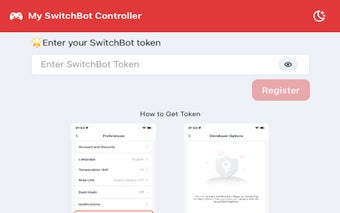
To get started, you need to obtain a token for the SwitchBot API. After installing the extension, the token can be found on the initial screen (How to Get Token). Once you have the token, simply copy or input it into the designated text box on the initial screen and click the "Register" button. The token will be stored locally in your browser's storage.
After registration, the extension will retrieve the device list from the SwitchBot API using the token you provided and display it on the screen. If the device list is not displayed, you can edit the token by clicking the "Edit" button in the bottom right corner or click the "Refresh" button to retrieve the device list again.
Each device in the list will have an ON/OFF button for power control. Simply click the button to toggle the power of the corresponding device.
Please note that the color of the device icons will change based on their status, except for Hub Mini devices which are not supported.
With my-switchbot-controler, you can conveniently control your SwitchBot devices remotely using your Chrome browser.